

runner. The runner is any callable that takes an input and returns a final value. Any harness works if it follows the instructions set in Building an eval and Runner.
Set your API keys
Every eval needs your PromptLayer key plus whatever provider your agent already uses. Export them once in your shell — both the AI and manual paths below assume these are set:export PROMPTLAYER_API_KEY=pl_...
export OPENAI_API_KEY=sk-... # or your provider's key
export ANTHROPIC_API_KEY=sk-ant-... # if your agent uses Claude
Set up with AI
Paste this prompt into Cursor (or any coding agent) in the repo that has your agent. It scaffolds an eval for you to review and run.Scaffold a PromptLayer SDK eval from this codebase
After the agent finishes
With your keys set, review the generatedevals/ file, then run it:
promptlayer eval run ./evals
Write an eval yourself
Use the PromptLayer tab when the prompt under test is in the Prompt Registry. Otherwise, choose the tab for the framework your production agent already uses. Do not replacepl.run with a direct OpenAI call, or replace an existing OpenAI call with pl.run, only for an eval. If you use a framework helper (OpenAI Agents, Claude, Vercel AI), tool spans are collected for you. For a custom agent with no helper, see Runner.
- PromptLayer
- OpenAI Agents
- Claude Agents
- Vercel AI SDK
- LiteLLM
- LangChain
- Pydantic AI
- OpenClaw
Use this path for agents whose prompts and tool schemas are stored in the Prompt Registry. The runner below executes each requested tool, appends its result to the agent state, and calls This example evaluates the Use
pl.run again until the model returns a final answer.pip install promptlayer
npm install promptlayer
production release of a Prompt Registry prompt named weather-agent. Configure it with:- A
user_messageinput variable - An
agent_messagesmessage placeholder after the user message - The instruction:
Use get_weather, then answer in one short sentence. - A schema-only Registry tool named
get_weatherwith a required string parameter namedcity
# evals/weather_agent.eval.py
import json

from promptlayer import (
    PromptLayer,
    contains_scorer,
    evaluate,
    trajectory_scorer,
)

pl = PromptLayer()

@pl.traceTool(name="get_weather")
def get_weather(city: str) -> dict:
    return {"city": city, "temperature_f": 72, "conditions": "sunny"}

def run_agent(user_message: str) -> str:
    agent_messages = []

    for _ in range(5):
        response = pl.run(
            prompt_name="weather-agent",
            prompt_release_label="production",
            input_variables={
                "user_message": user_message,
                "agent_messages": agent_messages,
            },
        )
        message = response["prompt_blueprint"]["prompt_template"]["messages"][-1]

        if not message.get("tool_calls"):
            return message["content"][-1]["text"]

        agent_messages.append(message)
        for tool_call in message["tool_calls"]:
            if tool_call["function"]["name"] != "get_weather":
                raise ValueError(f"Unknown tool: {tool_call['function']['name']}")

            arguments = json.loads(tool_call["function"]["arguments"])
            result = get_weather(**arguments)
            agent_messages.append({
                "role": "tool",
                "tool_call_id": tool_call["id"],
                "content": [{"type": "text", "text": json.dumps(result)}],
            })

    raise RuntimeError("Agent exceeded the five-turn limit")

evaluate(
    "weather-agent-eval",
    dataset=[{"input": "What is the weather in Tokyo?"}],
    runner=run_agent,
    scorers=[
        trajectory_scorer(expected=[["get_weather"]], mode="non_strict"),
        contains_scorer(source_column="Output", expected="72"),
    ],
    passing_score=1.0,
)
// evals/weather_agent.eval.ts
import {
  PromptLayer,
  containsScorer,
  evaluate,
  trajectoryScorer,
} from "promptlayer";

const pl = new PromptLayer();

const getWeather = pl.traceTool(
  "get_weather",
  async ({ city }) => ({ city, temperature_f: 72, conditions: "sunny" })
);

async function runAgent(userMessage) {
  const agentMessages = [];

  for (let turn = 0; turn < 5; turn++) {
    const response = await pl.run({
      promptName: "weather-agent",
      promptReleaseLabel: "production",
      inputVariables: {
        user_message: userMessage,
        agent_messages: agentMessages,
      },
    });
    const messages = response.prompt_blueprint.prompt_template.messages;
    const message = messages.at(-1);

    if (!message.tool_calls?.length) {
      return message.content.at(-1).text;
    }

    agentMessages.push(message);
    for (const toolCall of message.tool_calls) {
      if (toolCall.function.name !== "get_weather") {
        throw new Error(`Unknown tool: ${toolCall.function.name}`);
      }

      const result = await getWeather(JSON.parse(toolCall.function.arguments));
      agentMessages.push({
        role: "tool",
        tool_call_id: toolCall.id,
        content: [{ type: "text", text: JSON.stringify(result) }],
      });
    }
  }

  throw new Error("Agent exceeded the five-turn limit");
}

await evaluate("weather-agent-eval", {
  dataset: [{ input: "What is the weather in Tokyo?" }],
  runner: runAgent,
  scorers: [
    trajectoryScorer({ expected: [["get_weather"]], mode: "non_strict" }),
    containsScorer({ sourceColumn: "Output", expected: "72" }),
  ],
  passingScore: 1.0,
});
promptVersion / prompt_version instead when you need to pin an exact version. Keep the release label when the eval should continuously test the prompt currently assigned to an environment.pip install "promptlayer[openai-agents]"
npm install promptlayer @openai/agents zod
instrument_openai_agents / instrumentOpenAIAgents once at the top of your file, then run your Agent from the eval runner. Tool spans are collected automatically — no traceTool needed. The same helper works outside evals via the OpenAI Agents SDK integration.# evals/weather_agent.eval.py
from agents import Agent, Runner, function_tool
from promptlayer import evaluate, contains_scorer, trajectory_scorer
from promptlayer.integrations.openai_agents import instrument_openai_agents
instrument_openai_agents()
@function_tool
def get_weather(city: str) -> str:
"""Return demo weather for a city."""
return f"{city} is 72F and sunny."
agent = Agent(
name="Weather agent",
instructions="Use get_weather, then answer in one short sentence.",
model="gpt-5.6",
tools=[get_weather],
)
def run_agent(user_message: str) -> str:
result = Runner.run_sync(agent, user_message)
return str(result.final_output)
evaluate(
"weather-agent-eval",
dataset=[{"input": "What is the weather in Tokyo?"}],
runner=run_agent,
scorers=[
trajectory_scorer(
expected=[["get_weather"]],
mode="non_strict",
),
contains_scorer(source_column="Output", expected="72"),
],
passing_score=1.0,
)
// evals/weather_agent.eval.ts
import { Agent, run, tool } from "@openai/agents";
import { instrumentOpenAIAgents } from "promptlayer/openai-agents";
import { evaluate, containsScorer, trajectoryScorer } from "promptlayer";
import { z } from "zod";

await instrumentOpenAIAgents();

const getWeather = tool({
  name: "get_weather",
  description: "Return demo weather for a city.",
  parameters: z.object({
    city: z.string(),
  }),
  execute: async ({ city }) => `${city} is 72F and sunny.`,
});

const agent = new Agent({
  name: "Weather agent",
  instructions: "Use get_weather, then answer in one short sentence.",
  model: "gpt-5.6",
  tools: [getWeather],
});

async function runAgent(userMessage) {
  const result = await run(agent, userMessage);
  return String(result.finalOutput);
}

await evaluate("weather-agent-eval", {
  dataset: [{ input: "What is the weather in Tokyo?" }],
  runner: runAgent,
  scorers: [
    trajectoryScorer({
      expected: [["get_weather"]],
      mode: "non_strict",
    }),
    containsScorer({ sourceColumn: "Output", expected: "72" }),
  ],
  passingScore: 1.0,
});
Install:Call
pip install "promptlayer[claude-agents]"
npm install promptlayer @anthropic-ai/claude-agent-sdk
get_claude_config / getClaudeConfig inside the runner so the Claude session nests under the eval span. Pass plugin and env into ClaudeAgentOptions. The same helper works outside evals via the Claude Code integration.# evals/claude_agent.eval.py
import asyncio
import os
from claude_agent_sdk import (
AssistantMessage,
ClaudeAgentOptions,
ResultMessage,
TextBlock,
query,
)
from promptlayer import aevaluate, contains_scorer, trajectory_scorer
from promptlayer.integrations.claude_agents import get_claude_config
async def run_agent(user_message: str) -> str:
pl = get_claude_config()
options = ClaudeAgentOptions(
model="claude-sonnet-4-6",
cwd=".",
max_turns=3,
allowed_tools=["Bash"],
plugins=[pl.plugin],
env={**os.environ, **pl.env},
)
parts = []
async for message in query(prompt=user_message, options=options):
if isinstance(message, AssistantMessage):
for block in message.content:
if isinstance(block, TextBlock):
parts.append(block.text)
elif isinstance(message, ResultMessage) and message.result:
parts.append(message.result)
return "\n".join(parts)
asyncio.run(
aevaluate(
"claude-agent-eval",
dataset=[{
"input": "Run `echo hello` with Bash, then reply with the output in one short sentence.",
}],
runner=run_agent,
scorers=[
trajectory_scorer(
expected=[["Bash"]],
mode="non_strict",
),
contains_scorer(source_column="Output", expected="hello"),
],
passing_score=1.0,
)
)
// evals/claude_agent.eval.ts
import { query, type Options } from "@anthropic-ai/claude-agent-sdk";
import { getClaudeConfig } from "promptlayer/claude-agents";
import { evaluate, containsScorer, trajectoryScorer } from "promptlayer";

async function runAgent(userMessage) {
  const pl = getClaudeConfig();
  const options: Options = {
    model: "claude-sonnet-4-6",
    cwd: process.cwd(),
    maxTurns: 3,
    allowedTools: ["Bash"],
    plugins: [pl.plugin],
    env: { ...process.env, ...pl.env },
  };

  const parts = [];
  for await (const message of query({ prompt: userMessage, options })) {
    const text = extractText(message);
    if (text) parts.push(text);
  }
  return parts.join("\n");
}

function extractText(message) {
  if (!message || typeof message !== "object") return "";
  if (typeof message.result === "string") return message.result;
  if (!Array.isArray(message.content)) return "";
  return message.content
    .filter((block) => block?.type === "text" && typeof block.text === "string")
    .map((block) => block.text)
    .join("\n");
}

await evaluate("claude-agent-eval", {
  dataset: [{
    input: "Run `echo hello` with Bash, then reply with the output in one short sentence.",
  }],
  runner: runAgent,
  scorers: [
    trajectoryScorer({
      expected: [["Bash"]],
      mode: "non_strict",
    }),
    containsScorer({ sourceColumn: "Output", expected: "hello" }),
  ],
  passingScore: 1.0,
});
Install:Enable
npm install promptlayer ai @ai-sdk/openai zod
experimental_telemetry on the AI SDK call. evaluate(...) already registers PromptLayer’s OpenTelemetry exporter, so tool spans nest under the eval case — no separate NodeSDK setup for the eval path. For app-wide OTEL outside evals, follow the Vercel AI SDK integration.// evals/vercel_weather.eval.ts
import { generateText, tool, stepCountIs } from "ai";
import { openai } from "@ai-sdk/openai";
import { evaluate, containsScorer, trajectoryScorer } from "promptlayer";
import { z } from "zod";
async function runAgent(userMessage) {
const { text } = await generateText({
model: openai("gpt-5.6"),
prompt: String(userMessage),
tools: {
get_weather: tool({
description: "Return demo weather for a city.",
inputSchema: z.object({
city: z.string(),
}),
execute: async ({ city }) => `${city} is 72F and sunny.`,
}),
},
stopWhen: stepCountIs(5),
experimental_telemetry: {
isEnabled: true,
recordInputs: true,
recordOutputs: true,
},
});
return text;
}
await evaluate("vercel-weather-eval", {
dataset: [{ input: "What is the weather in Tokyo?" }],
runner: runAgent,
scorers: [
trajectoryScorer({
expected: [["get_weather"]],
mode: "non_strict",
}),
containsScorer({ sourceColumn: "Output", expected: "72" }),
],
passingScore: 1.0,
});
Install:Wrap tools with Set
pip install promptlayer litellm
traceTool for Trajectory, and set LiteLLM’s PromptLayer callback for request logging. LiteLLM does not emit separate Tool: spans on its own; during an eval, evaluate(...) supplies the active tracer used by traceTool.# evals/litellm_weather.eval.py
import json
import litellm
from litellm import completion
from promptlayer import PromptLayer, evaluate, contains_scorer, trajectory_scorer
pl = PromptLayer()
# Optional: also log LiteLLM LLM requests to PromptLayer
litellm.success_callback = ["promptlayer"]
@pl.traceTool(name="get_weather")
def get_weather(city: str) -> str:
return f"{city} is 72F and sunny."
TOOLS = [
{
"type": "function",
"function": {
"name": "get_weather",
"description": "Return demo weather for a city.",
"parameters": {
"type": "object",
"properties": {"city": {"type": "string"}},
"required": ["city"],
},
},
}
]
def run_agent(user_message: str) -> str:
messages = [
{
"role": "system",
"content": "Use get_weather, then answer in one short sentence.",
},
{"role": "user", "content": user_message},
]
for _ in range(5):
response = completion(
model="gpt-5.6",
messages=messages,
tools=TOOLS,
)
message = response.choices[0].message
messages.append(message)
if not message.tool_calls:
return (message.content or "").strip()
for tool_call in message.tool_calls:
args = json.loads(tool_call.function.arguments)
result = get_weather(**args)
messages.append(
{
"role": "tool",
"tool_call_id": tool_call.id,
"content": result,
}
)
return "Agent stopped without a final answer."
evaluate(
"litellm-weather-eval",
dataset=[{"input": "What is the weather in Tokyo?"}],
runner=run_agent,
scorers=[
trajectory_scorer(
expected=[["get_weather"]],
mode="non_strict",
),
contains_scorer(source_column="Output", expected="72"),
],
passing_score=1.0,
)
enable_tracing=True only if the same PromptLayer client and traced tools also run outside evaluate(...). Callbacks: LiteLLM and the LiteLLM PromptLayer docs.PromptLayer ingests LangChain spans through the LangSmith OpenTelemetry bridge to Set env before the process starts:Register the OTEL provider (same pattern as Integrations), then evaluate your agent:Reuse your real LangChain entrypoint as
https://api.promptlayer.com/v1/traces.Install (JavaScript):npm install promptlayer @langchain/core @langchain/openai langsmith \
@opentelemetry/api @opentelemetry/sdk-trace-base \
@opentelemetry/exporter-trace-otlp-proto @opentelemetry/context-async-hooks
LANGSMITH_TRACING=true
LANGSMITH_TRACING_MODE=otel
LANGCHAIN_CALLBACKS_BACKGROUND=false
OTEL_EXPORTER_OTLP_ENDPOINT=https://api.promptlayer.com/v1/traces
OTEL_EXPORTER_OTLP_HEADERS=X-API-KEY=<PROMPTLAYER_API_KEY>
// evals/langchain_weather.eval.ts
import { tool } from "@langchain/core/tools";
import { ChatOpenAI } from "@langchain/openai";
import { evaluate, containsScorer, trajectoryScorer } from "promptlayer";
import { z } from "zod";

const getWeather = tool(
  async ({ city }) => `${city} is 72F and sunny.`,
  {
    name: "get_weather",
    description: "Return demo weather for a city.",
    schema: z.object({ city: z.string() }),
  }
);

const llm = new ChatOpenAI({ model: "gpt-5.6" }).bindTools([getWeather]);

async function runAgent(userMessage: string) {
  const ai = await llm.invoke([
    ["system", "Use get_weather, then answer in one short sentence."],
    ["human", String(userMessage)],
  ]);
  if (!ai.tool_calls?.length) return String(ai.content ?? "");
  const call = ai.tool_calls[0];
  const toolResult = await getWeather.invoke(call.args);
  const final = await llm.invoke([
    ["system", "Use get_weather, then answer in one short sentence."],
    ["human", String(userMessage)],
    ai,
    {
      role: "tool",
      content: String(toolResult),
      tool_call_id: call.id,
    },
  ]);
  return String(final.content ?? "");
}

await evaluate("langchain-weather-eval", {
  dataset: [{ input: "What is the weather in Tokyo?" }],
  runner: runAgent,
  scorers: [
    trajectoryScorer({
      expected: [["get_weather"]],
      mode: "non_strict",
    }),
    containsScorer({ sourceColumn: "Output", expected: "72" }),
  ],
  passingScore: 1.0,
});
runner when you have one. Register OTEL once for the app using LangChain / LangSmith.PromptLayer ingests Pydantic AI OpenTelemetry (via Logfire) at The same Logfire →
https://api.promptlayer.com/v1/traces.Install:pip install promptlayer "pydantic-ai-slim[logfire,openai]" logfire opentelemetry-exporter-otlp-proto-http
# evals/pydantic_weather.eval.py
import os

import logfire
from pydantic_ai import Agent, RunContext
from promptlayer import evaluate, contains_scorer, trajectory_scorer

os.environ.setdefault(
    "OTEL_EXPORTER_OTLP_TRACES_ENDPOINT",
    "https://api.promptlayer.com/v1/traces",
)
os.environ.setdefault(
    "OTEL_EXPORTER_OTLP_HEADERS",
    f"X-API-KEY={os.environ['PROMPTLAYER_API_KEY']}",
)
os.environ.setdefault("OTEL_SERVICE_NAME", "pydantic-ai-eval")

logfire.configure(send_to_logfire=False)
logfire.instrument_pydantic_ai()

agent = Agent(
    "openai:gpt-5.6",
    instructions="Use get_weather, then answer in one short sentence.",
)

@agent.tool
def get_weather(_ctx: RunContext[None], city: str) -> str:
    """Return demo weather for a city."""
    return f"{city} is 72F and sunny."

def run_agent(user_message: str) -> str:
    return str(agent.run_sync(user_message).output)

evaluate(
    "pydantic-weather-eval",
    dataset=[{"input": "What is the weather in Tokyo?"}],
    runner=run_agent,
    scorers=[
        trajectory_scorer(
            expected=[["get_weather"]],
            mode="non_strict",
        ),
        contains_scorer(source_column="Output", expected="72"),
    ],
    passing_score=1.0,
)
/v1/traces path works outside evals via the Pydantic AI integration.PromptLayer ingests OpenClaw runs through Set Plugin install and config steps are in the OpenClaw integration.
@promptlayer/openclaw-promptlayer → /v1/traces.openclaw plugins install @promptlayer/openclaw-promptlayer
openclaw plugins enable openclaw-promptlayer
PROMPTLAYER_API_KEY, enable the plugin in openclaw.json, then point evaluate(...) at your existing OpenClaw entrypoint as runner (do not rebuild the agent in evals/).# evals/openclaw_agent.eval.py
from promptlayer import evaluate, contains_scorer, trajectory_scorer
from your_app.openclaw_entry import run_openclaw_agent # real entrypoint
evaluate(
"openclaw-agent-eval",
dataset=[{"input": "What is the weather in Tokyo?"}],
runner=run_openclaw_agent,
scorers=[
trajectory_scorer(
expected=[["get_weather"]], # your real tool names
mode="non_strict",
),
contains_scorer(source_column="Output", expected="72"),
],
passing_score=0.8,
)
Run it
Pointpromptlayer eval run at a directory (runs every *.eval.* file) or a single file:
promptlayer eval run ./evals
promptlayer eval run ./evals/weather_agent.eval.py
What you get
The CLI prints progress, per-scorer results, and a dashboard URL: • Initializing PromptLayer client
• Resolving Table
• Preparing experiment sheet
• Loading dataset
• Setting up columns
• Setting up scorers
• Running cases (1 case, concurrency=1)
✓ runners 1/1
• Importing traces and writing rows
• Scoring rows
✓ score 1
Evaluation Results:
┌────────────┬────────────┐
│ Scorer │ Result │
├────────────┼────────────┤
│ Trajectory │ 1/1 (100%) │
│ Contains │ 1/1 (100%) │
└────────────┴────────────┘
↗ https://dashboard.promptlayer.com/workspace/.../smart-tables/...
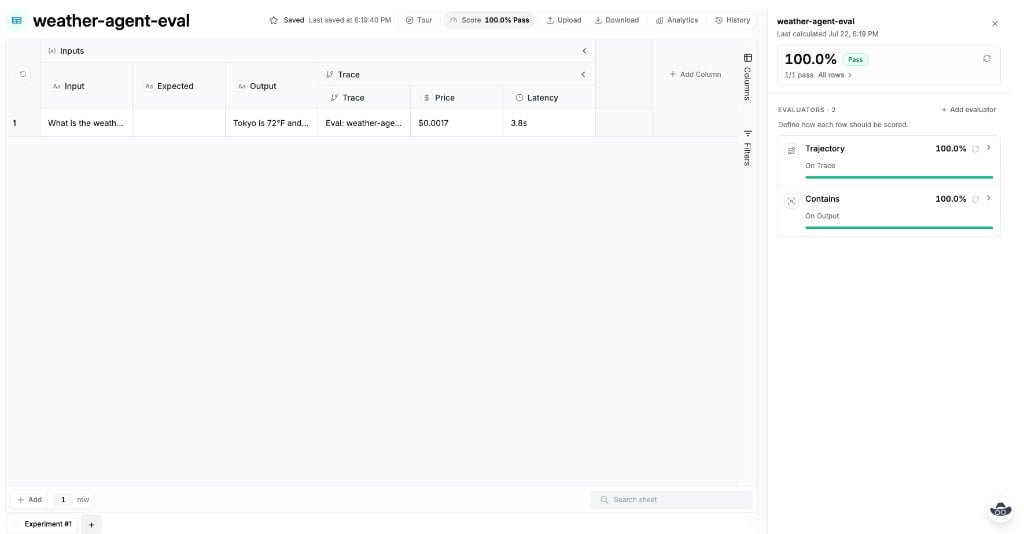
input, Output, and (when you score traces) a Trace group with price and latency. The score panel shows each scorer — here Trajectory on Trace and Contains on Output — plus the overall pass rate.
Next
Building an eval
Anatomy of
evaluate(...) — dataset, runner, scorers, and options.Datasets
Inline cases or a dashboard Table as the dataset.
Runner
Runner contract,
Tool: spans, and traceTool.Scorers
Typed helpers: Trajectory, Contains, Compare, and more.
CLI and CI
Run files locally and fail CI on a pass bar.