

Provider Details
OpenAI
- Chat Completions, Responses API, and Images API are all supported.
- Function/Tool Calling (including built-in Responses API tools: Web Search, File Search, Image Generation) — see Tool Calling.
- Image Generation via three paths: Images API (
dall-e-2,dall-e-3,gpt-image-1,gpt-image-1-mini,gpt-image-1.5,gpt-image-2), Responses APIimage_generationtool, and GPT Image models — see Image Generation. - JSON mode / structured outputs.
- Vision models (e.g.,
gpt-4-vision) — see FAQ: multimodal. - Streaming via SDK (Python/JS).
- Tip: Many OpenAI models are also available through OpenRouter, a first-class provider that routes to hundreds of models with a single key.
OpenAI Azure
- Same usage as OpenAI but configured with Azure deployment settings.
- Chat Completions, Responses API, and Images API are all supported — including the
image_generationbuilt-in tool and Images API models. - Ensure deployment name, API version, and resource URL are correctly configured.
- Most OpenAI features apply; some params differ per Azure config.
Anthropic
- Tool Use (Anthropic Messages API).
- Built-in tools: Web Search, Bash, Code Execution, Text Editor — see Tool Calling.
- Prompt Caching — supported on all Claude models. See Anthropic Prompt Caching below.
- Claude 3 family supports image inputs.
- Streaming via SDK.
- If you previously used “Anthropic Bedrock”, migrate to the native Anthropic provider or to Claude via Amazon Bedrock.
Google (Gemini)
- Multimodal support for images (input and output).
- Built-in tools: Google Search, Google Maps, Code Execution, URL Context, File Search — see Tool Calling.
- Native image generation with Gemini image models (
gemini-2.5-flash-image,gemini-3-pro-image-preview, etc.) — see Image Generation. - Use either the direct Google provider or Vertex AI based on your infrastructure preference.
Vertex AI
- Gemini and Anthropic Claude served through Google Cloud’s Vertex AI.
- Built-in tools vary by model family — see Tool Calling:
- Gemini models: Web Search, Google Maps, Code Execution, URL Context.
- Claude models: Web Search, Bash, Text Editor.
- Prompt Caching — supported for Claude models on Vertex AI. See Anthropic Prompt Caching below.
- Gemini image models are fully supported for native image generation via Vertex AI — see Image Generation.
- Configure project, region, and credentials as required by Vertex AI.
Amazon Bedrock
- Access Anthropic Claude, Meta Llama, Mistral, Cohere, AI21 Jamba, Nova, DeepSeek, Gemma, and GPT-OSS models via AWS Bedrock Converse API.
- Prompt Caching — supported for Claude models on Bedrock (PromptLayer handles the Bedrock
cachePointformat automatically). See Anthropic Prompt Caching below. - Structured output — Claude models on Bedrock receive the same JSON Schema normalization as the native Anthropic provider (including
oneOf→anyOfrewriting). Other Bedrock models use standard nullable-union normalization. - Capabilities vary per model family—see tool calling support below.
- Streaming via SDK (Python/JS).
- Full support (auto, any, specific tool): Claude, Mistral, GPT-OSS, Nova.
- Partial support (auto only): AI21 Jamba, Cohere, Llama.
- No tool calling: DeepSeek, Gemma.
auto— Model decides whether to use a tool or respond directly.any— Model must use one of the provided tools.- Specific tool — Force a particular tool (not supported by AI21 Jamba, Cohere, Llama).
- AI21 Jamba and Llama do not support streaming when tools are configured; use non-streaming requests.
- Cohere and Nova require underscores in tool names — PromptLayer automatically converts hyphens to underscores.
OpenRouter
- First-class native provider using the official OpenRouter SDK — one key for hundreds of routed models. See the OpenRouter integration guide.
- Chat (streaming + non-streaming), Image generation, Video generation (async job), and Speech / text-to-speech — selectable via the API type selector in the Playground.
- Structured outputs and function/tool calling on models that advertise support.
- Server (built-in) tools such as web search are available for OpenRouter models — see Tool Calling.
- Model IDs use OpenRouter’s
provider/modelform (e.g.,openai/gpt-4o-mini,anthropic/claude-3.5-sonnet).
Mistral
- Streaming supported; tool/function-call support depends on the specific model.
Cohere
- Command/Command-R family supported.
- Structured output — JSON Schema response format is supported and available in the Playground’s Advanced Model Controls.
- Feature availability (streaming, tool use) depends on the chosen model.
Hugging Face
- Evaluation support varies by model/task—text-generation models generally work best.
- For endpoints with OpenAI-compatible shims, you can configure via a custom base URL.
Anthropic Bedrock (Deprecated)
- This legacy integration is deprecated.
- Use the native Anthropic provider, or access Claude via Amazon Bedrock with the Bedrock provider.
OpenAI-compatible Base URL Providers
Many third‑party providers expose an OpenAI‑compatible API. You can connect any such provider by configuring a Provider Base URL that uses the OpenAI client. See Custom Providers for more details. How to set up:- Go to your workspace settings → “Provider Base URLs”.
- Click “Create New” and configure:
- LLM Provider: OpenAI
- Base URL: the provider’s endpoint (examples below)
- API Key: the provider’s key
- Optional: Create Custom Models for a cleaner model dropdown in the Playground/Prompt Registry.
- OpenRouter — now supported as a first-class native provider (recommended). The OpenAI-compatible base URL
https://openrouter.ai/api/v1also still works. - Exa — Base URL: https://api.exa.ai (see integration guide)
- xAI (Grok) — Base URL: https://api.x.ai/v1 (see integration guide)
- DeepSeek — Base URL: https://api.deepseek.com (see FAQ)
- Hugging Face gateways that offer OpenAI-compatible endpoints — use the gateway URL provided by your deployment
- Works in Logs, Prompt Registry, and Playground.
- Evaluations: supported when the provider’s OpenAI-compat layer matches PromptLayer parameters; remove unsupported params if needed (e.g., some providers do not support “seed”).
- Provider-specific parameters not in the standard OpenAI SDK (e.g.,
thinkingfor Kimi/Moonshot) are automatically forwarded to the provider in the request body — no extra configuration needed. - Tool/Function Calling and streaming availability depend on the provider/model.
Anthropic Prompt Caching
Anthropic’s prompt caching lets you cache repeated content (system instructions, tool definitions, few-shot examples) so it isn’t re-processed on every request. Cached input tokens cost up to 90% less than uncached tokens after the initial write. PromptLayer supports this for Claude models on Anthropic, Vertex AI, and Amazon Bedrock.Automatic caching
Set a cache duration in the Advanced Model Controls (Prompt Caching dropdown) to automatically cache system messages and tool definitions.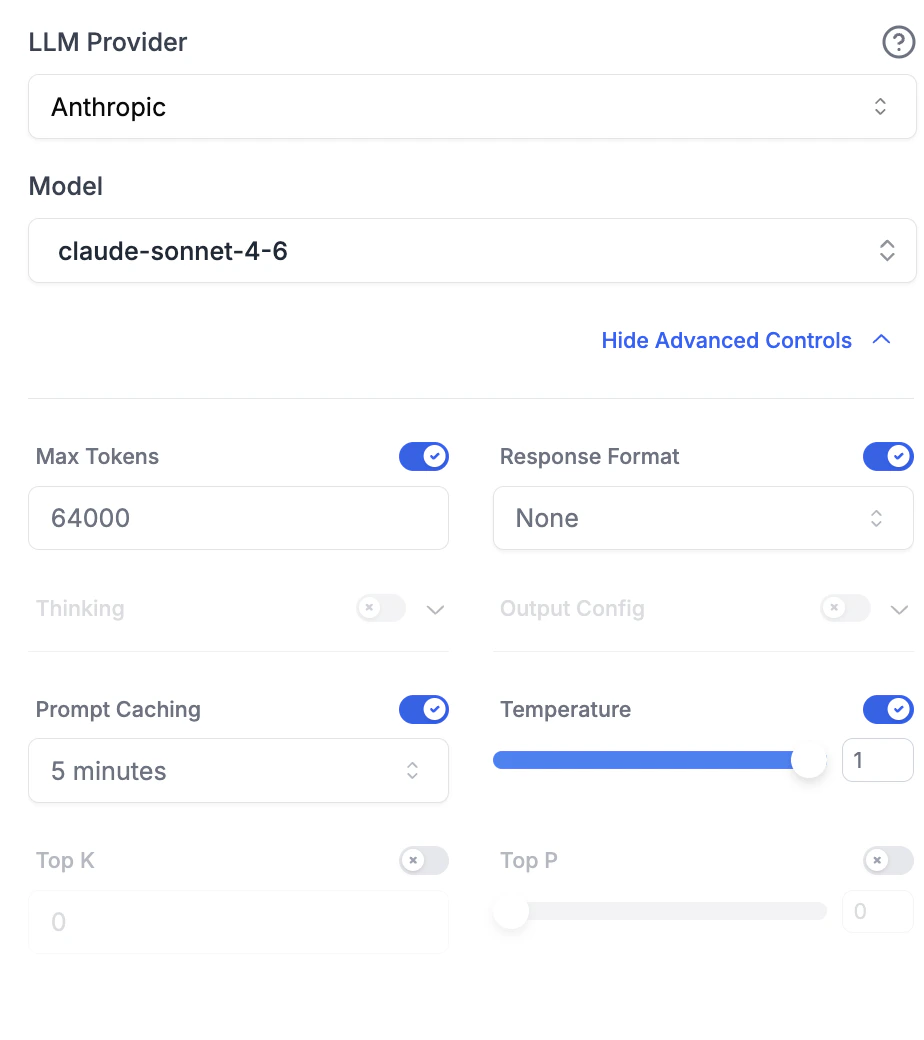
Block-level caching
For fine-grained control, you can mark individual content blocks for caching directly in the Playground. When a Claude model is selected, cacheable blocks display a small cache icon.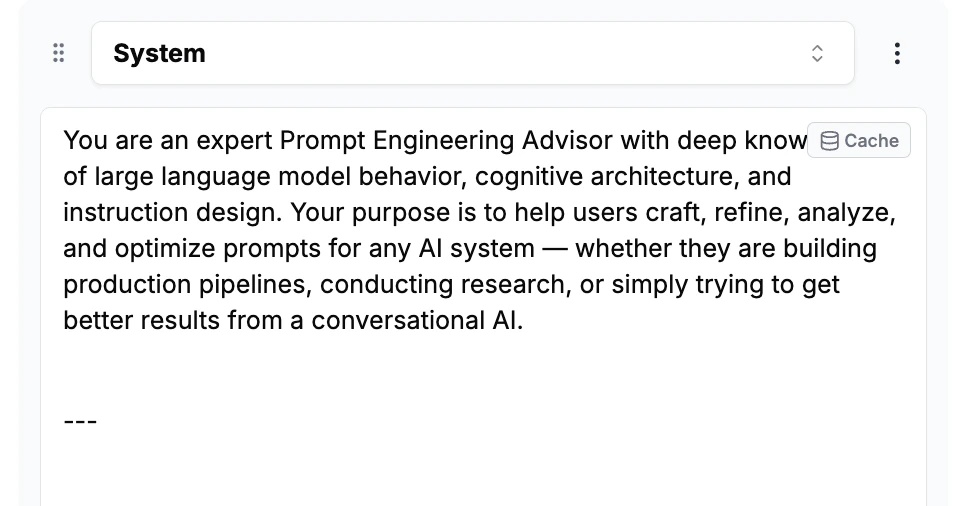
- Text blocks in system, user, or assistant messages
- Tool calls in assistant messages
- Tool results in tool messages
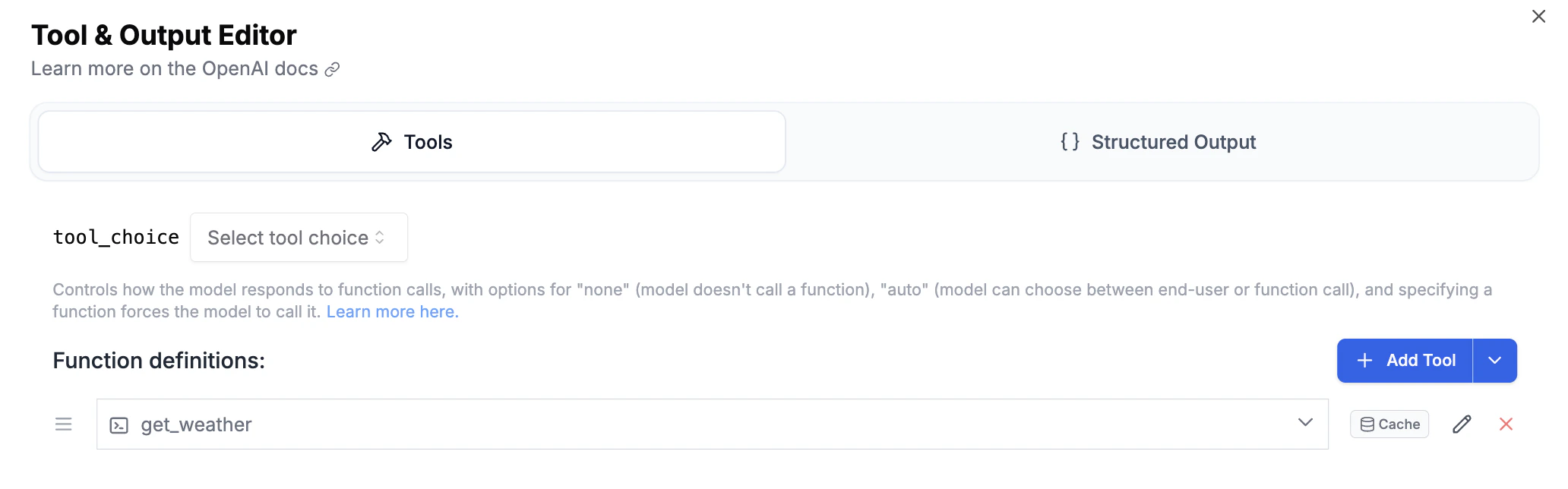
- Tool definitions in the Tool & Output Editor
Viewing cache usage
When caching is active, the request log detail page shows Cache Write and Cache Read token counts alongside the standard metrics.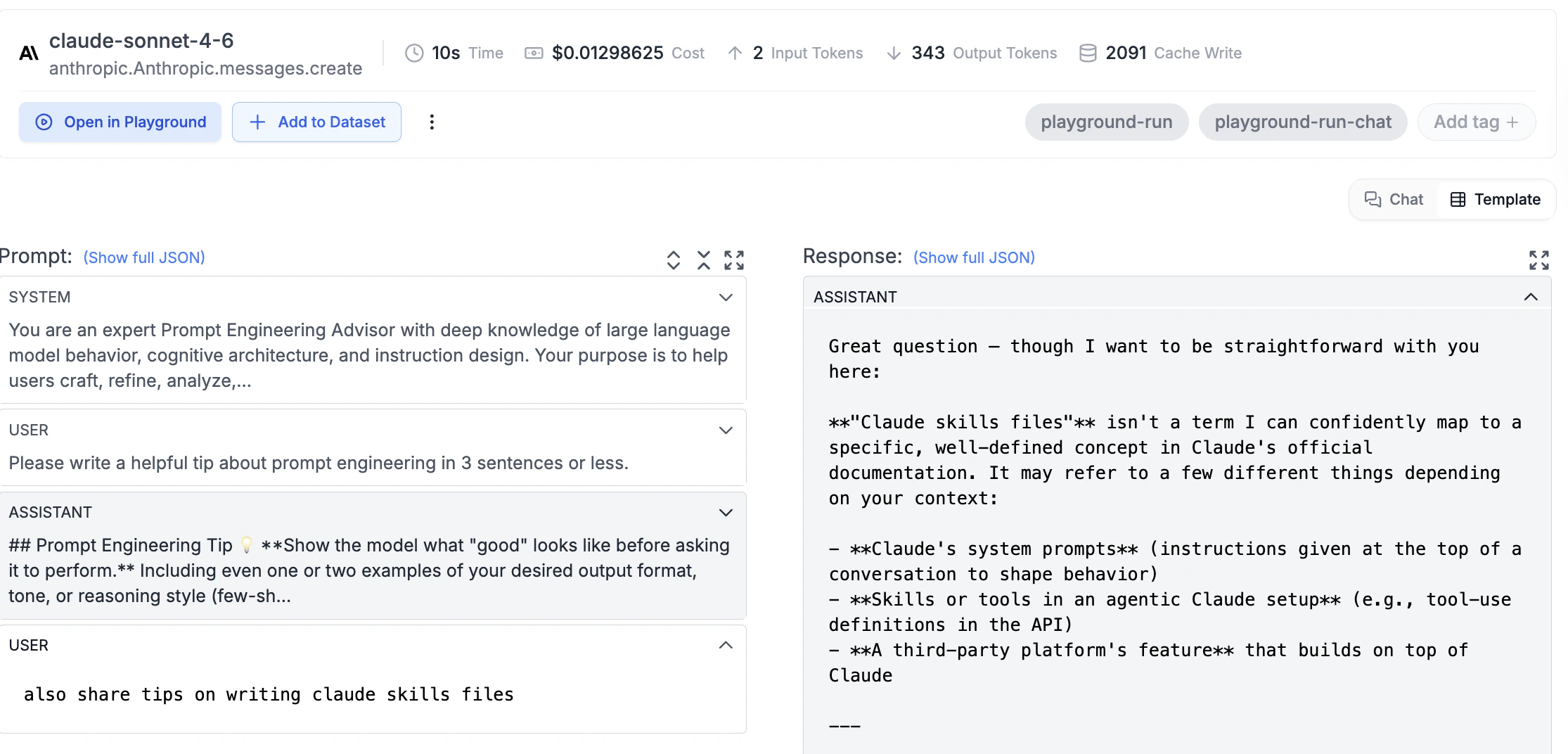
Anthropic requires a minimum of 1,024 tokens (2,048 for Claude 3.5 Haiku) in the cached content for caching to activate.