> ## Documentation Index
> Fetch the complete documentation index at: https://docs.promptlayer.com/llms.txt
> Use this file to discover all available pages before exploring further.
# Quickstart
The main entity that you are evaluating in an eval is represented by a `runner`. The `runner` is any callable that takes an `input` and returns a final value. Any harness works if it follows the instructions set in [Building an eval](/sdks/evals/building-an-eval) and [Runner](/sdks/evals/agent-tracing).
## Set your API keys
Every eval needs your PromptLayer key plus whatever provider your agent already uses. Export them once in your shell — both the AI and manual paths below assume these are set:
```bash theme={null}
export PROMPTLAYER_API_KEY=pl_...
export OPENAI_API_KEY=sk-... # or your provider's key
export ANTHROPIC_API_KEY=sk-ant-... # if your agent uses Claude
```
## Set up with AI
Paste this prompt into Cursor (or any coding agent) in the repo that has your agent. It scaffolds an eval for you to review and run.
You are setting up PromptLayer SDK evals in this repository.
## Step 0 — Research, then optional AskQuestion
### 0a — Research first
Quickly scan the repo for likely agent entrypoints and tool handlers (e.g. `Agent`, `Runner`, `generateText`, `tools/`, `@function_tool`, `traceTool`). Collect concrete candidates as `path:symbol`. Do not invent paths.
### 0b — AskQuestion only if available
If the **AskQuestion** tool is in your tool list, use it once (multiple questions in one call when possible) before editing:
1. `purpose` — What should this eval prove?
* Tool trajectory / Final-answer quality / Regression gate (tools + answer) (Recommended)
2. `entrypoint` — Which production entrypoint should be the `runner`? (researched `path:symbol` options; recommended first)
3. `tools` (`allow_multiple: true`) — Where are tools defined or executed? (researched options, or No tools / N/A)
4. `mocks` — Mock tools / side effects? No (Recommended) / Yes
If **AskQuestion is not available**, do **not** ask these in chat and do **not** block. Proceed immediately with defaults from research:
* Purpose: regression gate if tools exist, otherwise final-answer quality
* Entrypoint: best researched candidate
* Tools: researched tool handlers, or none
* Mocks: no
### 0c — Brief plan, then build
In chat (short bullets), state the purpose, entrypoint, tools, mock policy, and scorers you will use — then make the changes. Do not wait for approval unless the user already objected.
## Default policy (unless the user says otherwise)
* Reuse the **existing** agent entrypoint as `runner`.
* Prefer **not** mocking tools.
* Make the smallest possible instrumentation changes.
* Keep the eval file thin: import real runner + dataset + `evaluate(...)`.
Allowed without asking again:
* Thin adapter that only maps dataset `input` → existing function args.
* Minimal instrumentation on existing modules (`traceTool`, framework plugin, `experimental_telemetry`).
Forbidden unless the user explicitly approved mocks / a rewrite:
* Recreating the tool loop in `evals/`.
* Parallel “evalable slice” agents with in-memory fake tools.
* Copying production logic into a new demo agent.
## Goals
1. Use the chosen entrypoint and tool paths (do not silently switch after asking).
2. Install only packages this project needs.
3. Apply minimal instrumentation per the chosen stack and mock policy.
4. Add `evals/.eval.py` or `evals/.eval.ts` with a **10-case** dataset and `evaluate(...)`.
5. Make it runnable with `promptlayer eval run `.
## Product constraints (do not invent APIs)
Follow current PromptLayer SDK evals docs:
* Primary API: top-level `evaluate(...)` (Python also has `aevaluate` for async runners).
* Recommended run path: put `evaluate(...)` in a file, then run `promptlayer eval run `.
* Do **not** use a removed/demoted `client.evals.run` API.
* The runner can be **any** existing agent entrypoint (any framework or a plain function). Do not rebuild the agent to match an example stack.
* For Trajectory, tools must appear as Trace spans named `Tool: `. Prefer the lightest path that already fits the repo:
* OpenAI Agents (if used): `instrument_openai_agents()` / `instrumentOpenAIAgents()` from `promptlayer.integrations.openai_agents` / `promptlayer/openai-agents`. No `traceTool` needed.
* Claude Agents (if used): call `get_claude_config()` / `getClaudeConfig()` **inside** the eval runner and pass `plugin` + `env` into Claude Agent options. No `traceTool` needed.
* Vercel AI SDK (JS, if used): enable `experimental_telemetry` on the existing `generateText` / agent calls. No separate NodeSDK needed for the eval path.
* LangChain / LangSmith (if used): LangSmith OTEL bridge → `https://api.promptlayer.com/v1/traces` (see Integrations).
* Pydantic AI (if used): `logfire.instrument_pydantic_ai()` with OTLP export to PromptLayer `/v1/traces`.
* OpenClaw (if used): `@promptlayer/openclaw-promptlayer` plugin enabled; reuse the real OpenClaw entrypoint as `runner`.
* LiteLLM (Python, if used): `PromptLayer(enable_tracing=True)`, optional `litellm.success_callback = ["promptlayer"]`, and `traceTool` on **existing** tool handlers.
* Anything else / custom agent: wrap **existing** handlers with PromptLayer `traceTool` (JS: `pl.traceTool("name", fn)`; Python: `@pl.traceTool(name="name")`).
* For custom / raw OpenAI client runners: keep the repo’s existing client. Prefer the official OpenAI client over `pl.openai.OpenAI()` / `new pl.OpenAI()` unless the repo already depends on the PromptLayer provider wrapper.
* Dataset cases use `input`, plus optional `expected` (expected output). Add `expected_trace` / `expectedTrace` only when using Trajectory.
* Prefer scorers that match the purpose: Trajectory for tool path, Contains / Compare / LLM assertion for the final answer.
* Results must land in PromptLayer Tables via the SDK eval runner.
## Step 1 — Confirm from research
* Confirm the production agent entrypoint and tool execution path.
* Inventory the real input shape.
* Note existing PromptLayer / OpenTelemetry / provider instrumentation.
## Step 2 — Install
* Only install what is missing for the chosen stack.
* Document required env vars: `PROMPTLAYER_API_KEY`, plus whatever the real agent already needs.
## Step 3 — Instrumentation / mocks
* **Mocks = no:** edit existing tool handlers / agent setup in place only.
* **Mocks = yes:** mock only approved side effects; keep the real loop/entrypoint; do not rebuild the agent.
* Use a framework helper only when the repo already uses that stack; otherwise use `traceTool` (or existing OTEL) on real tool handlers.
* Do not break production paths; keep diffs small and eval-focused.
## Step 4 — Thin eval file
Create `evals/.eval.py` or `evals/.eval.ts` that:
1. Imports `evaluate` / scorers.
2. Imports the real agent entrypoint (or a tiny input adapter).
3. Avoids redefining the agent/tool loop unless the user approved that approach.
4. Builds a **dataset of 10 cases** aligned to the purpose and input shape.
5. Chooses scorers from the purpose (Trajectory when tools matter; Contains / Compare / LLM assertion for answers). Default `passing_score` / `passingScore` to `0.8`.
6. Calls top-level `evaluate("", ...)`.
## Step 5 — Verify
* Show how to run: `promptlayer eval run ./evals`
* Quote the import of the real runner.
* Summarize purpose, entrypoint, tools, and mock policy used.
* List files changed, 10 dataset inputs, env vars, and TODOs.
## Output format
* Research → AskQuestion **only if available** → otherwise proceed with defaults → build.
* Never dump a chat quiz when AskQuestion is missing.
* End with a short checklist: installs, files added/changed, runner import path, how to run, env vars, remaining TODOs.
* Do not silently invent a replacement agent.
### After the agent finishes
With your keys set, review the generated `evals/` file, then run it:
```bash theme={null}
promptlayer eval run ./evals
```
## Write an eval yourself
Pick the tab that matches your stack. If you use a framework helper (OpenAI Agents, Claude, Vercel AI), tool spans are collected for you. For a custom agent with no helper, see [Runner](/sdks/evals/agent-tracing).
```bash Python theme={null}
pip install "promptlayer[openai-agents]"
```
```bash JavaScript theme={null}
npm install promptlayer @openai/agents zod
```
Call `instrument_openai_agents` / `instrumentOpenAIAgents` once at the top of your file, then run your Agent from the eval `runner`. Tool spans are collected automatically — no `traceTool` needed. The same helper works outside evals via the [OpenAI Agents SDK](/features/integrations#openai-agents-sdk) integration.
```python Python theme={null}
# evals/weather_agent.eval.py
from agents import Agent, Runner, function_tool
from promptlayer import evaluate, contains_scorer, trajectory_scorer
from promptlayer.integrations.openai_agents import instrument_openai_agents
instrument_openai_agents()
@function_tool
def get_weather(city: str) -> str:
"""Return demo weather for a city."""
return f"{city} is 72F and sunny."
agent = Agent(
name="Weather agent",
instructions="Use get_weather, then answer in one short sentence.",
model="gpt-5.6",
tools=[get_weather],
)
def run_agent(user_message: str) -> str:
result = Runner.run_sync(agent, user_message)
return str(result.final_output)
evaluate(
"weather-agent-eval",
dataset=[{"input": "What is the weather in Tokyo?"}],
runner=run_agent,
scorers=[
trajectory_scorer(
accepted_scenarios=[["get_weather"]],
mode="non_strict",
),
contains_scorer(source="Output", value="72"),
],
passing_score=1.0,
)
```
```javascript JavaScript theme={null}
// evals/weather_agent.eval.ts
import { Agent, run, tool } from "@openai/agents";
import { instrumentOpenAIAgents } from "promptlayer/openai-agents";
import { evaluate, containsScorer, trajectoryScorer } from "promptlayer";
import { z } from "zod";
await instrumentOpenAIAgents();
const getWeather = tool({
name: "get_weather",
description: "Return demo weather for a city.",
parameters: z.object({
city: z.string(),
}),
execute: async ({ city }) => `${city} is 72F and sunny.`,
});
const agent = new Agent({
name: "Weather agent",
instructions: "Use get_weather, then answer in one short sentence.",
model: "gpt-5.6",
tools: [getWeather],
});
async function runAgent(userMessage) {
const result = await run(agent, userMessage);
return String(result.finalOutput);
}
await evaluate("weather-agent-eval", {
dataset: [{ input: "What is the weather in Tokyo?" }],
runner: runAgent,
scorers: [
trajectoryScorer({
acceptedScenarios: [["get_weather"]],
mode: "non_strict",
}),
containsScorer({ source: "Output", value: "72" }),
],
passingScore: 1.0,
});
```
Install:
```bash Python theme={null}
pip install "promptlayer[claude-agents]"
```
```bash JavaScript theme={null}
npm install promptlayer @anthropic-ai/claude-agent-sdk
```
Call `get_claude_config` / `getClaudeConfig` **inside** the runner so the Claude session nests under the eval span. Pass `plugin` and `env` into `ClaudeAgentOptions`. The same helper works outside evals via the [Claude Code](/features/integrations#claude-code) integration.
```python Python theme={null}
# evals/claude_agent.eval.py
import asyncio
import os
from claude_agent_sdk import (
AssistantMessage,
ClaudeAgentOptions,
ResultMessage,
TextBlock,
query,
)
from promptlayer import aevaluate, contains_scorer, trajectory_scorer
from promptlayer.integrations.claude_agents import get_claude_config
async def run_agent(user_message: str) -> str:
pl = get_claude_config()
options = ClaudeAgentOptions(
model="claude-sonnet-4-6",
cwd=".",
max_turns=3,
allowed_tools=["Bash"],
plugins=[pl.plugin],
env={**os.environ, **pl.env},
)
parts = []
async for message in query(prompt=user_message, options=options):
if isinstance(message, AssistantMessage):
for block in message.content:
if isinstance(block, TextBlock):
parts.append(block.text)
elif isinstance(message, ResultMessage) and message.result:
parts.append(message.result)
return "\n".join(parts)
asyncio.run(
aevaluate(
"claude-agent-eval",
dataset=[{
"input": "Run `echo hello` with Bash, then reply with the output in one short sentence.",
}],
runner=run_agent,
scorers=[
trajectory_scorer(
accepted_scenarios=[["Bash"]],
mode="non_strict",
),
contains_scorer(source="Output", value="hello"),
],
passing_score=1.0,
)
)
```
```javascript JavaScript theme={null}
// evals/claude_agent.eval.ts
import { query, type Options } from "@anthropic-ai/claude-agent-sdk";
import { getClaudeConfig } from "promptlayer/claude-agents";
import { evaluate, containsScorer, trajectoryScorer } from "promptlayer";
async function runAgent(userMessage) {
const pl = getClaudeConfig();
const options: Options = {
model: "claude-sonnet-4-6",
cwd: process.cwd(),
maxTurns: 3,
allowedTools: ["Bash"],
plugins: [pl.plugin],
env: { ...process.env, ...pl.env },
};
const parts = [];
for await (const message of query({ prompt: userMessage, options })) {
const text = extractText(message);
if (text) parts.push(text);
}
return parts.join("\n");
}
function extractText(message) {
if (!message || typeof message !== "object") return "";
if (typeof message.result === "string") return message.result;
if (!Array.isArray(message.content)) return "";
return message.content
.filter((block) => block?.type === "text" && typeof block.text === "string")
.map((block) => block.text)
.join("\n");
}
await evaluate("claude-agent-eval", {
dataset: [{
input: "Run `echo hello` with Bash, then reply with the output in one short sentence.",
}],
runner: runAgent,
scorers: [
trajectoryScorer({
acceptedScenarios: [["Bash"]],
mode: "non_strict",
}),
containsScorer({ source: "Output", value: "hello" }),
],
passingScore: 1.0,
});
```
Install:
```bash theme={null}
npm install promptlayer ai @ai-sdk/openai zod
```
Enable `experimental_telemetry` on the AI SDK call. `evaluate(...)` already registers PromptLayer's OpenTelemetry exporter, so tool spans nest under the eval case — no separate `NodeSDK` setup for the eval path. For app-wide OTEL outside evals, follow the [Vercel AI SDK](/features/integrations#vercel-ai-sdk) integration.
```typescript theme={null}
// evals/vercel_weather.eval.ts
import { generateText, tool, stepCountIs } from "ai";
import { openai } from "@ai-sdk/openai";
import { evaluate, containsScorer, trajectoryScorer } from "promptlayer";
import { z } from "zod";
async function runAgent(userMessage) {
const { text } = await generateText({
model: openai("gpt-5.6"),
prompt: String(userMessage),
tools: {
get_weather: tool({
description: "Return demo weather for a city.",
inputSchema: z.object({
city: z.string(),
}),
execute: async ({ city }) => `${city} is 72F and sunny.`,
}),
},
stopWhen: stepCountIs(5),
experimental_telemetry: {
isEnabled: true,
recordInputs: true,
recordOutputs: true,
},
});
return text;
}
await evaluate("vercel-weather-eval", {
dataset: [{ input: "What is the weather in Tokyo?" }],
runner: runAgent,
scorers: [
trajectoryScorer({
acceptedScenarios: [["get_weather"]],
mode: "non_strict",
}),
containsScorer({ source: "Output", value: "72" }),
],
passingScore: 1.0,
});
```
Install:
```bash theme={null}
pip install promptlayer litellm
```
Enable PromptLayer tracing with `PromptLayer(enable_tracing=True)`, wrap tools with [`traceTool`](/running-requests/traces#tracing-tools) for Trajectory, and set LiteLLM's PromptLayer callback for request logging. LiteLLM does not emit separate `Tool:` spans on its own — `traceTool` is a no-op unless that `PromptLayer` instance has tracing enabled.
```python theme={null}
# evals/litellm_weather.eval.py
import json
import litellm
from litellm import completion
from promptlayer import PromptLayer, evaluate, contains_scorer, trajectory_scorer
# Required: PromptLayer tracing for Tool: spans / Trajectory
pl = PromptLayer(enable_tracing=True)
# Optional: also log LiteLLM LLM requests to PromptLayer
litellm.success_callback = ["promptlayer"]
@pl.traceTool(name="get_weather")
def get_weather(city: str) -> str:
return f"{city} is 72F and sunny."
TOOLS = [
{
"type": "function",
"function": {
"name": "get_weather",
"description": "Return demo weather for a city.",
"parameters": {
"type": "object",
"properties": {"city": {"type": "string"}},
"required": ["city"],
},
},
}
]
def run_agent(user_message: str) -> str:
messages = [
{
"role": "system",
"content": "Use get_weather, then answer in one short sentence.",
},
{"role": "user", "content": user_message},
]
for _ in range(5):
response = completion(
model="gpt-5.6",
messages=messages,
tools=TOOLS,
)
message = response.choices[0].message
messages.append(message)
if not message.tool_calls:
return (message.content or "").strip()
for tool_call in message.tool_calls:
args = json.loads(tool_call.function.arguments)
result = get_weather(**args)
messages.append(
{
"role": "tool",
"tool_call_id": tool_call.id,
"content": result,
}
)
return "Agent stopped without a final answer."
evaluate(
"litellm-weather-eval",
dataset=[{"input": "What is the weather in Tokyo?"}],
runner=run_agent,
scorers=[
trajectory_scorer(
accepted_scenarios=[["get_weather"]],
mode="non_strict",
),
contains_scorer(source="Output", value="72"),
],
passing_score=1.0,
)
```
`evaluate(...)` enables tracing on its own client for nesting under each eval case, but your separate `PromptLayer(...)` instance still needs `enable_tracing=True` for `@pl.traceTool`. Callbacks: [LiteLLM](/features/integrations#litellm) and the [LiteLLM PromptLayer docs](https://docs.litellm.ai/docs/observability/promptlayer_integration).
PromptLayer ingests LangChain spans through the [LangSmith OpenTelemetry bridge](/features/integrations#langchain-/-langsmith) to `https://api.promptlayer.com/v1/traces`.
Install (JavaScript):
```bash theme={null}
npm install promptlayer @langchain/core @langchain/openai langsmith \
@opentelemetry/api @opentelemetry/sdk-trace-base \
@opentelemetry/exporter-trace-otlp-proto @opentelemetry/context-async-hooks
```
Set env before the process starts:
```bash theme={null}
LANGSMITH_TRACING=true
LANGSMITH_TRACING_MODE=otel
LANGCHAIN_CALLBACKS_BACKGROUND=false
OTEL_EXPORTER_OTLP_ENDPOINT=https://api.promptlayer.com/v1/traces
OTEL_EXPORTER_OTLP_HEADERS=X-API-KEY=
```
Register the OTEL provider (same pattern as [Integrations](/features/integrations#langchain-/-langsmith)), then evaluate your agent:
```typescript theme={null}
// evals/langchain_weather.eval.ts
import { tool } from "@langchain/core/tools";
import { ChatOpenAI } from "@langchain/openai";
import { evaluate, containsScorer, trajectoryScorer } from "promptlayer";
import { z } from "zod";
const getWeather = tool(
async ({ city }) => `${city} is 72F and sunny.`,
{
name: "get_weather",
description: "Return demo weather for a city.",
schema: z.object({ city: z.string() }),
}
);
const llm = new ChatOpenAI({ model: "gpt-5.6" }).bindTools([getWeather]);
async function runAgent(userMessage: string) {
const ai = await llm.invoke([
["system", "Use get_weather, then answer in one short sentence."],
["human", String(userMessage)],
]);
if (!ai.tool_calls?.length) return String(ai.content ?? "");
const call = ai.tool_calls[0];
const toolResult = await getWeather.invoke(call.args);
const final = await llm.invoke([
["system", "Use get_weather, then answer in one short sentence."],
["human", String(userMessage)],
ai,
{
role: "tool",
content: String(toolResult),
tool_call_id: call.id,
},
]);
return String(final.content ?? "");
}
await evaluate("langchain-weather-eval", {
dataset: [{ input: "What is the weather in Tokyo?" }],
runner: runAgent,
scorers: [
trajectoryScorer({
acceptedScenarios: [["get_weather"]],
mode: "non_strict",
}),
containsScorer({ source: "Output", value: "72" }),
],
passingScore: 1.0,
});
```
Reuse your real LangChain entrypoint as `runner` when you have one. Register OTEL once for the app using [LangChain / LangSmith](/features/integrations#langchain-/-langsmith).
PromptLayer ingests Pydantic AI OpenTelemetry (via Logfire) at `https://api.promptlayer.com/v1/traces`.
Install:
```bash theme={null}
pip install promptlayer "pydantic-ai-slim[logfire,openai]" logfire opentelemetry-exporter-otlp-proto-http
```
```python theme={null}
# evals/pydantic_weather.eval.py
import os
import logfire
from pydantic_ai import Agent, RunContext
from promptlayer import evaluate, contains_scorer, trajectory_scorer
os.environ.setdefault(
"OTEL_EXPORTER_OTLP_TRACES_ENDPOINT",
"https://api.promptlayer.com/v1/traces",
)
os.environ.setdefault(
"OTEL_EXPORTER_OTLP_HEADERS",
f"X-API-KEY={os.environ['PROMPTLAYER_API_KEY']}",
)
os.environ.setdefault("OTEL_SERVICE_NAME", "pydantic-ai-eval")
logfire.configure(send_to_logfire=False)
logfire.instrument_pydantic_ai()
agent = Agent(
"openai:gpt-5.6",
instructions="Use get_weather, then answer in one short sentence.",
)
@agent.tool
def get_weather(_ctx: RunContext[None], city: str) -> str:
"""Return demo weather for a city."""
return f"{city} is 72F and sunny."
def run_agent(user_message: str) -> str:
return str(agent.run_sync(user_message).output)
evaluate(
"pydantic-weather-eval",
dataset=[{"input": "What is the weather in Tokyo?"}],
runner=run_agent,
scorers=[
trajectory_scorer(
accepted_scenarios=[["get_weather"]],
mode="non_strict",
),
contains_scorer(source="Output", value="72"),
],
passing_score=1.0,
)
```
The same Logfire → `/v1/traces` path works outside evals via the [Pydantic AI](/features/integrations#pydantic-ai) integration.
PromptLayer ingests OpenClaw runs through `@promptlayer/openclaw-promptlayer` → `/v1/traces`.
```bash theme={null}
openclaw plugins install @promptlayer/openclaw-promptlayer
openclaw plugins enable openclaw-promptlayer
```
Set `PROMPTLAYER_API_KEY`, enable the plugin in `openclaw.json`, then point `evaluate(...)` at your existing OpenClaw entrypoint as `runner` (do not rebuild the agent in `evals/`).
```python theme={null}
# evals/openclaw_agent.eval.py
from promptlayer import evaluate, contains_scorer, trajectory_scorer
from your_app.openclaw_entry import run_openclaw_agent # real entrypoint
evaluate(
"openclaw-agent-eval",
dataset=[{"input": "What is the weather in Tokyo?"}],
runner=run_openclaw_agent,
scorers=[
trajectory_scorer(
accepted_scenarios=[["get_weather"]], # your real tool names
mode="non_strict",
),
contains_scorer(source="Output", value="72"),
],
passing_score=0.8,
)
```
Plugin install and config steps are in the [OpenClaw](/features/integrations#openclaw) integration.
## Run it
Point `promptlayer eval run` at a directory (runs every `*.eval.*` file) or a single file:
```bash theme={null}
promptlayer eval run ./evals
promptlayer eval run ./evals/weather_agent.eval.py
```
## What you get
The CLI prints progress, per-scorer results, and a dashboard URL:
```text theme={null}
• Initializing PromptLayer client
• Resolving Table
• Preparing experiment sheet
• Loading dataset
• Setting up columns
• Setting up scorers
• Running cases (1 case, concurrency=1)
✓ runners 1/1
• Importing traces and writing rows
• Scoring rows
✓ score 1
Evaluation Results:
┌────────────┬────────────┐
│ Scorer │ Result │
├────────────┼────────────┤
│ Trajectory │ 1/1 (100%) │
│ Contains │ 1/1 (100%) │
└────────────┴────────────┘
↗ https://dashboard.promptlayer.com/workspace/.../smart-tables/...
```
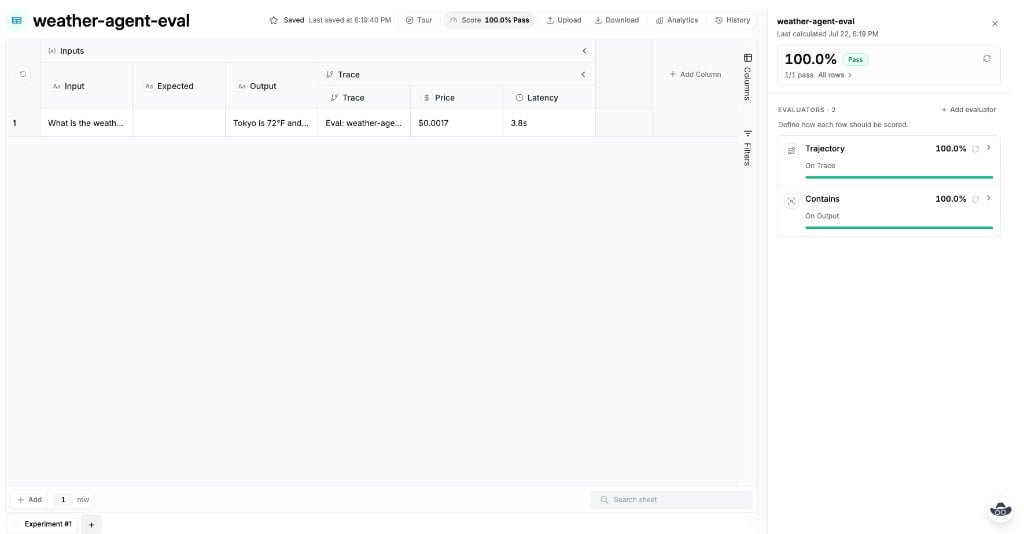
Each run also writes a Table experiment sheet with `Input`, `Output`, and (when you score traces) a `Trace` group with price and latency. The score panel shows each scorer — here Trajectory on Trace and Contains on Output — plus the overall pass rate.
 ## Next
Anatomy of `evaluate(...)` — dataset, runner, scorers, and options.
Inline cases or a dashboard Table as the dataset.
Runner contract, `Tool:` spans, and `traceTool`.
Typed helpers: Trajectory, Contains, Compare, and more.
Run files locally and fail CI on a pass bar.
## Next
Anatomy of `evaluate(...)` — dataset, runner, scorers, and options.
Inline cases or a dashboard Table as the dataset.
Runner contract, `Tool:` spans, and `traceTool`.
Typed helpers: Trajectory, Contains, Compare, and more.
Run files locally and fail CI on a pass bar.