> ## Documentation Index
> Fetch the complete documentation index at: https://docs.promptlayer.com/llms.txt
> Use this file to discover all available pages before exploring further.
# Column Types
> Reference for input and computed Table column types, including evaluation columns, helper columns, and composition.
Table column types reuse PromptLayer's evaluation and workflow building blocks, plus the Tables-specific **Composition** reference type. For creating these types from SDK `evaluate(...)`, see [Scorers](/sdks/evals/scorers/overview) and [Columns](/sdks/evals/columns/overview).
Most type values (`COMPARE`, `PROMPT_TEMPLATE`, `LLM_ASSERTION`, `CODE_EXECUTION`, and the helper/eval types below) match the evaluation pipeline and workflow node enums documented in [Node & Column Types](/features/evaluations/column-types).
**Tables-only:** `COMPOSITION` is not part of the legacy evaluation or workflow node enum. Use it only in Tables to mirror a column from another sheet or table.
## Input, reference, and computed columns
Table columns fall into three groups:
| Group | Type value | Behavior |
| ------------- | --------------------------- | -------------------------------------------------------------------------------------------------------------------------------------- |
| **Input** | `TEXT` | Stores editable values you set manually, paste, or import. Text cells do not run. |
| **Reference** | `COMPOSITION` | Mirrors a value from another sheet or table. Does not execute per row. |
| **Computed** | All other type values below | Runs per row, tracks cell status (`QUEUED`, `RUNNING`, `COMPLETED`, `FAILED`, `STALE`), and can become stale when dependencies change. |
Put source data in input columns, then add computed columns left to right for each workflow step. Use composition when multiple sheets should share the same upstream result. See [Cells and Runs](/features/tables/cells-and-runs) for status and rerun behavior.
## How sources work
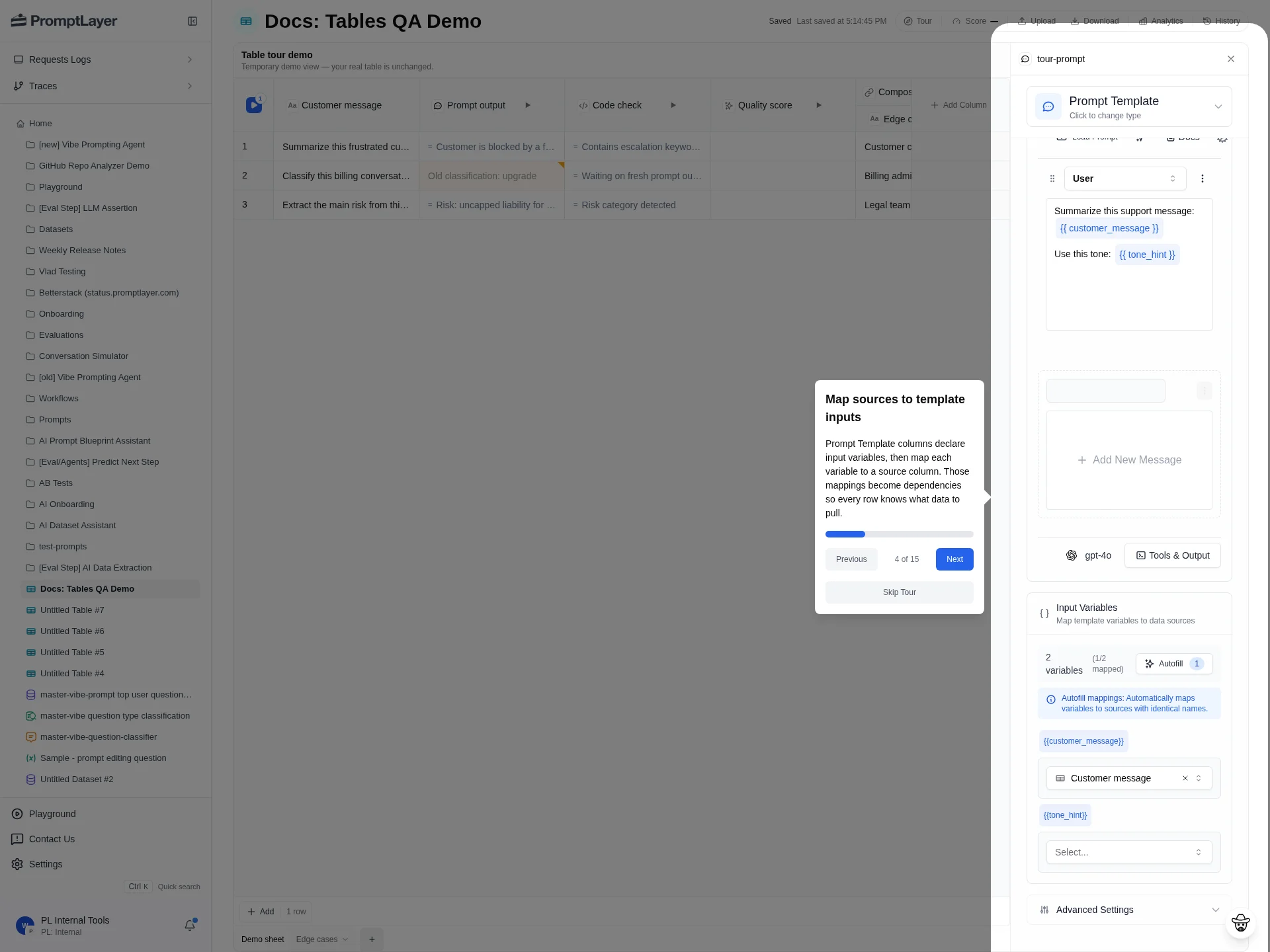
Computed columns read from source columns in the sheet. For example, a `Prompt output` column can map a prompt variable to `Customer message`, and a `Quality score` column can read from `Prompt output`. If a source changes, dependent computed cells can become stale.
 ## Column type reference
Type values use UPPERCASE enum strings. The UI label is what you see in the column picker.
### Input column
| UI label | Type value | Use when |
| -------- | ---------- | --------------------------------------------------------------------------- |
| Text | `TEXT` | You need editable input data, expected answers, labels, metadata, or notes. |
### Reference column
| UI label | Type value | Use when |
| ----------- | ------------- | ----------------------------------------------------------------------------------------- |
| Composition | `COMPOSITION` | You want to reference data from another sheet or table without re-running upstream logic. |
### Computed columns
| UI label | Type value | Category | Compute cost | Use when |
| ------------------------- | --------------------------- | ----------------------- | ---------------------------------------------- | ------------------------------------------------------------------------- |
| Prompt Template | `PROMPT_TEMPLATE` | Data source / execution | LLM — one or more model requests per row | You want to run a Prompt Registry template or inline prompt for each row. |
| Workflow | `WORKFLOW` | Data source / execution | Variable — depends on the workflow's nodes | You want a row to execute a PromptLayer workflow. |
| Code Execution | `CODE_EXECUTION` | Data source / execution | Compute — server-side code per row | You need Python or JavaScript logic per row. |
| Endpoint | `ENDPOINT` | Data source / execution | External — outbound HTTP per row | You want to send row data to an external URL endpoint. |
| MCP | `MCP` | Data source / execution | External — MCP server calls per row | You want to call Model Context Protocol server functions. |
| Conversation Simulator | `CONVERSATION_SIMULATOR` | Data source / execution | LLM — multiple model turns per row | You want to simulate a multi-turn user and assistant conversation. |
| Human | `HUMAN` | Data source / execution | None — waits for manual input | You need a human to fill in or approve data. |
| While Loop | `WHILE_LOOP` | Data source / execution | Variable — multiplies inner step cost | You need repeated execution while a condition remains true. |
| For Loop | `FOR_LOOP` | Data source / execution | Variable — multiplies inner step cost | You need to iterate over a collection or array. |
| Compare | `COMPARE` | Simple eval | None — deterministic check | You want to compare values and generate a diff or comparison result. |
| Contains | `CONTAINS` | Simple eval | None — deterministic check | You want to check whether text contains a substring. |
| Regex | `REGEX` | Simple eval | None — deterministic check | You want to validate text against a regular expression. |
| Absolute Numeric Distance | `ABSOLUTE_NUMERIC_DISTANCE` | Simple eval | None — deterministic check | You want the absolute distance between numeric values. |
| Assert Valid | `ASSERT_VALID` | Simple eval | None — deterministic check | You want to validate data types or formats. |
| Math Operator | `MATH_OPERATOR` | Simple eval | None — deterministic check | You want mathematical comparisons such as greater than or less than. |
| LLM Assertion | `LLM_ASSERTION` | LLM eval | LLM — one or more model requests per row | You want an LLM to judge whether an assertion is true. |
| AI Data Extraction | `AI_DATA_EXTRACTION` | LLM eval | LLM — one or more model requests per row | You want an LLM to extract specific information from text. |
| Cosine Similarity | `COSINE_SIMILARITY` | LLM eval | LLM — embedding or similarity requests per row | You want semantic similarity between vectors or text embeddings. |
| JSON Extraction | `JSON_PATH` | Helper | None — deterministic transform | You want to extract values from JSON with JSONPath. |
| XML Path | `XML_PATH` | Helper | None — deterministic transform | You want to extract values from XML with XPath. |
| Regex Extraction | `REGEX_EXTRACTION` | Helper | None — deterministic transform | You want to extract capture groups from text. |
| Parse Value | `PARSE_VALUE` | Helper | None — deterministic transform | You want to parse a specific value from structured or unstructured data. |
| Count | `COUNT` | Helper | None — deterministic transform | You want counts of elements, characters, or occurrences. |
| Min Max | `MIN_MAX` | Helper | None — deterministic transform | You want the minimum or maximum value from numeric inputs. |
| Coalesce | `COALESCE` | Helper | None — deterministic transform | You want the first non-null value from several sources. |
| Combine Columns | `COMBINE_COLUMNS` | Helper | None — deterministic transform | You want to merge values from multiple sources into one output. |
| Apply Diff | `APPLY_DIFF` | Helper | None — deterministic transform | You want to apply a unified diff patch to text. |
**Condition** appears in Workflow node selectors, but it is not a Table column type. Use Table-supported comparison, assertion, or helper columns for row-level checks.
## Compute cost notes
Computed columns run once per row (and again on reruns). Cost depends on the column type:
* **None** — Helper columns, simple eval columns, `HUMAN`, and `COMPOSITION` do not call models or external services on their own.
* **LLM** — `PROMPT_TEMPLATE`, `LLM_ASSERTION`, `AI_DATA_EXTRACTION`, `COSINE_SIMILARITY`, and `CONVERSATION_SIMULATOR` make model requests. Prompt Template columns expose per-cell cost, latency, and token metrics. Use [History and Analytics](/features/tables/history-and-analytics) to inspect request-level details.
* **External** — `ENDPOINT` and `MCP` call services outside PromptLayer. Cost depends on your endpoint or MCP server.
* **Compute** — `CODE_EXECUTION` runs server-side code per row.
* **Variable** — `WORKFLOW`, `FOR_LOOP`, and `WHILE_LOOP` cost depends on the nested steps they execute.
Running a sheet across many rows multiplies cost for LLM and external columns. Prefer deterministic helper and simple eval columns when checks do not need a model. Use stale-cell reruns instead of full-sheet reruns when only some inputs changed.
## Composition
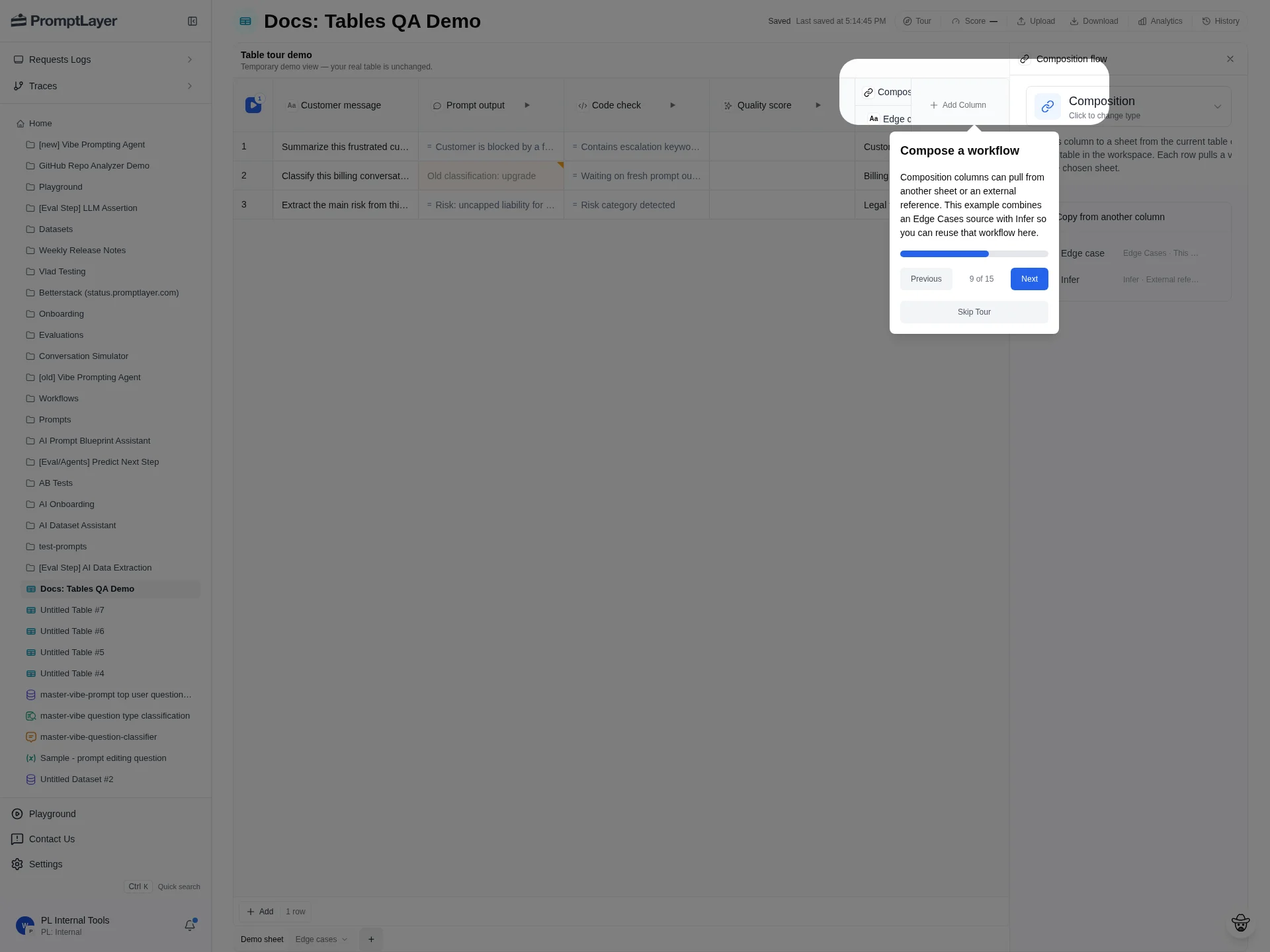
Composition references a source table, sheet, and column, then pulls that value into the current sheet. Use it when multiple sheets should share a reusable intermediate result instead of copying logic.
## Column type reference
Type values use UPPERCASE enum strings. The UI label is what you see in the column picker.
### Input column
| UI label | Type value | Use when |
| -------- | ---------- | --------------------------------------------------------------------------- |
| Text | `TEXT` | You need editable input data, expected answers, labels, metadata, or notes. |
### Reference column
| UI label | Type value | Use when |
| ----------- | ------------- | ----------------------------------------------------------------------------------------- |
| Composition | `COMPOSITION` | You want to reference data from another sheet or table without re-running upstream logic. |
### Computed columns
| UI label | Type value | Category | Compute cost | Use when |
| ------------------------- | --------------------------- | ----------------------- | ---------------------------------------------- | ------------------------------------------------------------------------- |
| Prompt Template | `PROMPT_TEMPLATE` | Data source / execution | LLM — one or more model requests per row | You want to run a Prompt Registry template or inline prompt for each row. |
| Workflow | `WORKFLOW` | Data source / execution | Variable — depends on the workflow's nodes | You want a row to execute a PromptLayer workflow. |
| Code Execution | `CODE_EXECUTION` | Data source / execution | Compute — server-side code per row | You need Python or JavaScript logic per row. |
| Endpoint | `ENDPOINT` | Data source / execution | External — outbound HTTP per row | You want to send row data to an external URL endpoint. |
| MCP | `MCP` | Data source / execution | External — MCP server calls per row | You want to call Model Context Protocol server functions. |
| Conversation Simulator | `CONVERSATION_SIMULATOR` | Data source / execution | LLM — multiple model turns per row | You want to simulate a multi-turn user and assistant conversation. |
| Human | `HUMAN` | Data source / execution | None — waits for manual input | You need a human to fill in or approve data. |
| While Loop | `WHILE_LOOP` | Data source / execution | Variable — multiplies inner step cost | You need repeated execution while a condition remains true. |
| For Loop | `FOR_LOOP` | Data source / execution | Variable — multiplies inner step cost | You need to iterate over a collection or array. |
| Compare | `COMPARE` | Simple eval | None — deterministic check | You want to compare values and generate a diff or comparison result. |
| Contains | `CONTAINS` | Simple eval | None — deterministic check | You want to check whether text contains a substring. |
| Regex | `REGEX` | Simple eval | None — deterministic check | You want to validate text against a regular expression. |
| Absolute Numeric Distance | `ABSOLUTE_NUMERIC_DISTANCE` | Simple eval | None — deterministic check | You want the absolute distance between numeric values. |
| Assert Valid | `ASSERT_VALID` | Simple eval | None — deterministic check | You want to validate data types or formats. |
| Math Operator | `MATH_OPERATOR` | Simple eval | None — deterministic check | You want mathematical comparisons such as greater than or less than. |
| LLM Assertion | `LLM_ASSERTION` | LLM eval | LLM — one or more model requests per row | You want an LLM to judge whether an assertion is true. |
| AI Data Extraction | `AI_DATA_EXTRACTION` | LLM eval | LLM — one or more model requests per row | You want an LLM to extract specific information from text. |
| Cosine Similarity | `COSINE_SIMILARITY` | LLM eval | LLM — embedding or similarity requests per row | You want semantic similarity between vectors or text embeddings. |
| JSON Extraction | `JSON_PATH` | Helper | None — deterministic transform | You want to extract values from JSON with JSONPath. |
| XML Path | `XML_PATH` | Helper | None — deterministic transform | You want to extract values from XML with XPath. |
| Regex Extraction | `REGEX_EXTRACTION` | Helper | None — deterministic transform | You want to extract capture groups from text. |
| Parse Value | `PARSE_VALUE` | Helper | None — deterministic transform | You want to parse a specific value from structured or unstructured data. |
| Count | `COUNT` | Helper | None — deterministic transform | You want counts of elements, characters, or occurrences. |
| Min Max | `MIN_MAX` | Helper | None — deterministic transform | You want the minimum or maximum value from numeric inputs. |
| Coalesce | `COALESCE` | Helper | None — deterministic transform | You want the first non-null value from several sources. |
| Combine Columns | `COMBINE_COLUMNS` | Helper | None — deterministic transform | You want to merge values from multiple sources into one output. |
| Apply Diff | `APPLY_DIFF` | Helper | None — deterministic transform | You want to apply a unified diff patch to text. |
**Condition** appears in Workflow node selectors, but it is not a Table column type. Use Table-supported comparison, assertion, or helper columns for row-level checks.
## Compute cost notes
Computed columns run once per row (and again on reruns). Cost depends on the column type:
* **None** — Helper columns, simple eval columns, `HUMAN`, and `COMPOSITION` do not call models or external services on their own.
* **LLM** — `PROMPT_TEMPLATE`, `LLM_ASSERTION`, `AI_DATA_EXTRACTION`, `COSINE_SIMILARITY`, and `CONVERSATION_SIMULATOR` make model requests. Prompt Template columns expose per-cell cost, latency, and token metrics. Use [History and Analytics](/features/tables/history-and-analytics) to inspect request-level details.
* **External** — `ENDPOINT` and `MCP` call services outside PromptLayer. Cost depends on your endpoint or MCP server.
* **Compute** — `CODE_EXECUTION` runs server-side code per row.
* **Variable** — `WORKFLOW`, `FOR_LOOP`, and `WHILE_LOOP` cost depends on the nested steps they execute.
Running a sheet across many rows multiplies cost for LLM and external columns. Prefer deterministic helper and simple eval columns when checks do not need a model. Use stale-cell reruns instead of full-sheet reruns when only some inputs changed.
## Composition
Composition references a source table, sheet, and column, then pulls that value into the current sheet. Use it when multiple sheets should share a reusable intermediate result instead of copying logic.
 ## Tables API type values
The [Tables REST API](/reference/table-sheet-columns-list) uses the same uppercase enum strings as the UI (`TEXT`, `COMPARE`, `PROMPT_TEMPLATE`, `COMPOSITION`, and so on). Set the specific column behavior in `config`.
For backwards compatibility, create-column requests also accept lowercase aliases such as `text`, `prompt_template`, `llm`, `code`, `score`, `comparison`, and `composition`. PromptLayer normalizes these to the uppercase enum before storing the column.
Shared computed types (`COMPARE`, `PROMPT_TEMPLATE`, `LLM_ASSERTION`, `CODE_EXECUTION`, helper columns, and the rest except `TEXT` and `COMPOSITION`) use the same configuration schemas as Workflows and legacy Evaluations. See [Node & Column Types](/features/evaluations/column-types) for those schemas.
`COMPOSITION` is Tables-only. Do not use it in legacy evaluation or workflow column definitions.
## API references
Use the generated API reference for exact request schemas when creating or updating columns programmatically.
Create text or computed columns.
Update title, config, and dependencies.
## Tables API type values
The [Tables REST API](/reference/table-sheet-columns-list) uses the same uppercase enum strings as the UI (`TEXT`, `COMPARE`, `PROMPT_TEMPLATE`, `COMPOSITION`, and so on). Set the specific column behavior in `config`.
For backwards compatibility, create-column requests also accept lowercase aliases such as `text`, `prompt_template`, `llm`, `code`, `score`, `comparison`, and `composition`. PromptLayer normalizes these to the uppercase enum before storing the column.
Shared computed types (`COMPARE`, `PROMPT_TEMPLATE`, `LLM_ASSERTION`, `CODE_EXECUTION`, helper columns, and the rest except `TEXT` and `COMPOSITION`) use the same configuration schemas as Workflows and legacy Evaluations. See [Node & Column Types](/features/evaluations/column-types) for those schemas.
`COMPOSITION` is Tables-only. Do not use it in legacy evaluation or workflow column definitions.
## API references
Use the generated API reference for exact request schemas when creating or updating columns programmatically.
Create text or computed columns.
Update title, config, and dependencies.